I have spent the last 2 weeks trying to get my head around PushButton Engine. The engine was recommended to be through online communities and groups and seemed to be a great engine but what I found a nuisance was the lack straight forward documentation to get up and running to where I wanted to be. Most of the examples I found were through the PushButton Engine website, Google Code, Blogs, Forums. This is the process I went through to learn it hopefully it will help someone somewhere. I firstly downloaded the engine and followed the get started instructions which was very helpful and straight forward and explained how to set it up using different software. Then I began to learn the architecture of PushButton Engine. I then completed the 5 lessons on the docs section and read through the references section which goes through all the basics needed to understand the specific parts of how the engine works. The best advice I could give is to understand the XML level file or templates as it is the key of why PushButton engine has so much potential. There is also video tutorials that explain concepts involved in the engine they are in general 5 minute long and well worth watching. The best tutorials I came across were Matthew Capersons Hubfolio. They create a working example with all the concepts used appropriately. Matthew shows show templates and levels are used correctly and effectively. Another good blog I found helpful were Nate Becks a developer in the PushButton Engine team. Another developer who contributes to the open source project PushButton Engine is Lavon Woods who has created an Isometric Component for PushButton Engine and added video tutorials on the basics of PushButton Engine. To see how a project is generated in Flex or Flash or Flash Develop click here. If you explore through these you will see how they are generated and what files are put where. After 2 weeks of going through it all i figure I have a good understanding of it but if I knew where to find all the related documentation it definitely would have been a quicker process.
Monday, March 21, 2011
Thursday, March 17, 2011
Game Builder Studio
During my research into PushButton Engine and learning its techniques I came across GameBuilder Studio in the showcase of things made with PushButton Engine. GameBuilder Studio applies PushButton Engine's modular approach towards flash game development it makes it easy to use the approach doing all the coding for you making it easier for you to develop your game.
GameBuilder Studio is the first and only “End-to-End”, flash based game editor for professional developers, game studios and educational institutions. It is equipped with the necessary tools for developers to build isometric flash games similar to Farmville & Social City or 3D games and deploy them directly to iPhone, Android, and Facebook, without having to start from the ground up, increasing developer productivity, and cutting down on development time and cost. The simplicity of its user interface allows for in-experienced game developers to jump right in and start creating but provides more experienced game developers with the ability to add enhanced features as needed using the editors plugin API and sell those plugins on the open market place.
It is only in Beta version at the moment and the developers are sending out beta versions to developers to test them and provide feedback. I inquired to the head develop Lavon Woods to see if GBS was suitable for my project and could I get a beta version.
Hey Lavon,
I'am a student in Ireland doing a project that will create a basic version of a
social game such as Farmville, My Town etc I have been learning
Push Button Engine but after coming across Game Builder Studio I think it would
be perfect to complete the project. Would it be suitable for
my type of project? If so could I receive a beta version of Game Builder Studio?
Regards,
Shane
His response......
Hi Shane,
Yes GBS would be perfect for what you are working on, unfortunatly we are currently not sending out any invites, there is currently a waiting list. When we send out another update in the coming weeks, we will be hand picking individuals that we can work closely with to test GBS. I will add you to the list. Thanks for your interest.
Lavon Woods (Lead Architect & Founder)
His response confirmed my first taught that GBS is perfect to create my game but I wont be able to use it as I wont get a beta version in time to use it for my project this could have saved me a lot of work and time that I could be using on some other aspect of the project
Monday, March 7, 2011
Thursday, March 3, 2011
A poll I sent out on Facebook
I used an app called survey to send out a survey so i could gather appropriate volunteers to test the application later on. This is a screen shot of the survey and followed my the results screen just after sending out the survey one hour ago. The results can be exported to excel once i have generated enough.
The Results Screen...
Wednesday, March 2, 2011
Paper Prototyping
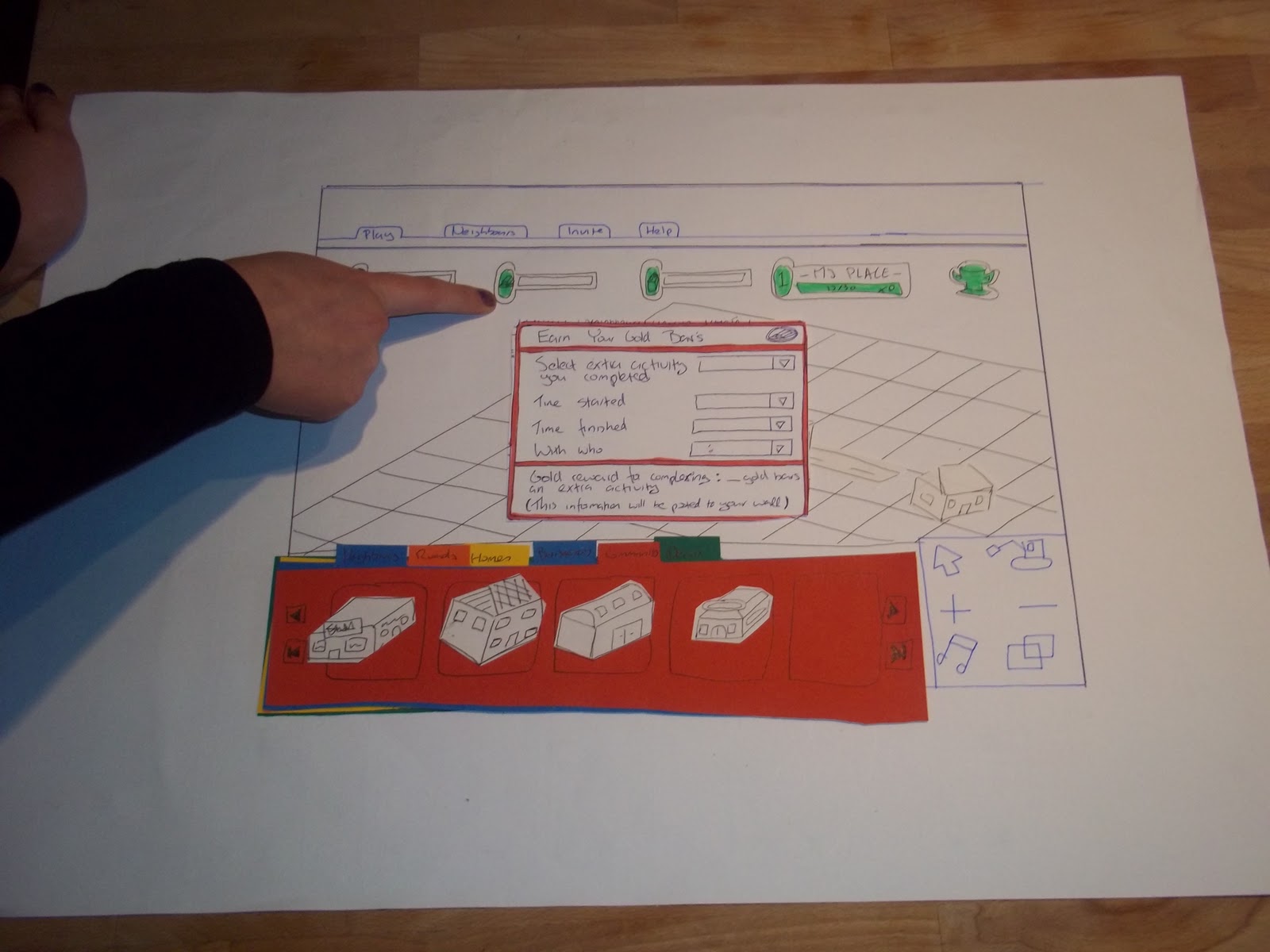
I created this paper prototype to check the efficiency of the user interface. I got 4 people who have played social games before to play around with the UI to see if they understood it. I firstly explained the process of the game so they would have a basic understanding of how the game works. I got positive feedback regarding layout. Overall I was happy with their comments.
Thursday, February 24, 2011
PushButton Engine
Nate Beck explains all there is to know about the basic concepts and ideals of PushButton in this video http://zaa.tv/2011/01/flexible-games-360-flex-san-jose-2010/ recorded at San Jose at the 360 Flex Conference. I would recomend watching this video to understand PushButton.
Monday, February 21, 2011
Another way of creating Isometric buildings
I found this website that actual is there just for creating buildings in an isometric view called ISO Builder check it out : http://www.iso.webmonk.de/
Subscribe to:
Posts (Atom)